Looking to boost your academic productivity, collaboration, and communication?
Here are 40 key benefits of Gmail for students, especially when using Google Workspace for Education..
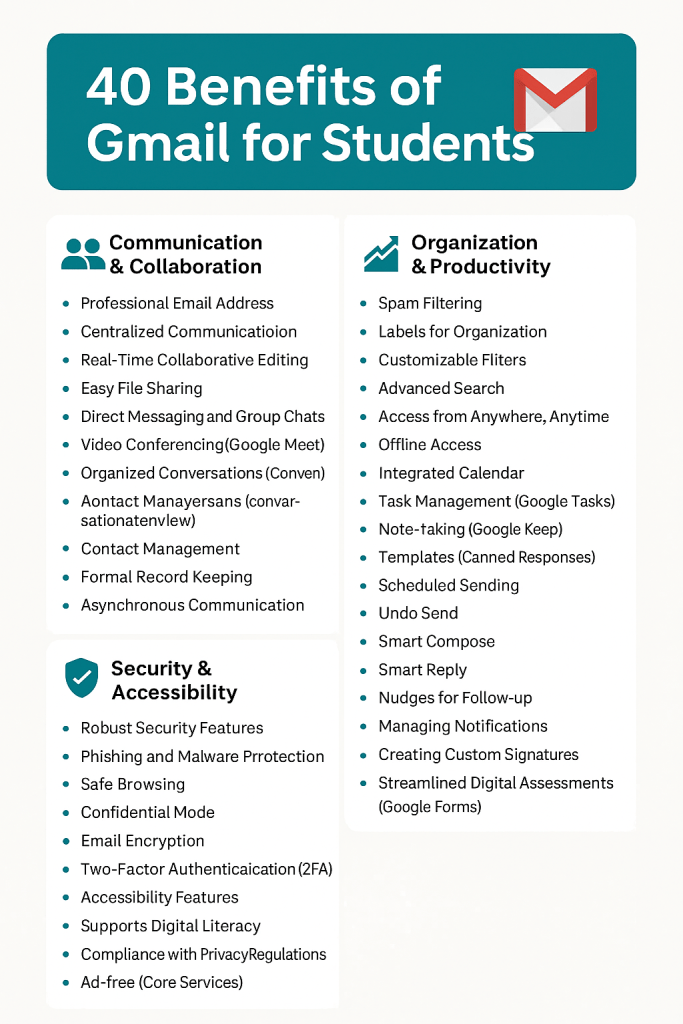
Let’s see in more details:
Communication & Collaboration Benefits of Gmail for Students
1. Professional Email Address
Students get a school-branded Gmail ID that looks credible and professional for resumes, internships, and college applications.
2. Centralized Communication
Keep all your school emails, notifications, and updates in one centralized Gmail inbox.
3. Real-Time Collaboration with Google Docs
Work with classmates in real-time using integrated tools like Google Docs, Sheets, and Slides.
4. Easy File Sharing via Google Drive
Quickly share assignments, large PDFs, or group project files using Gmail + Google Drive.
5. Direct Messaging & Group Chats (Google Chat)
Gmail integrates seamlessly with Google Chat for fast peer-to-peer or group discussions.
6. HD Video Conferencing with Google Meet
Host virtual study sessions, attend online classes, or get tutoring help – all within Gmail.
7. Conversation View for Organized Threads
Related emails stay grouped together, making it easy to follow conversations and feedback.
8. Contact Management Made Easy
Create contact groups (like “Science Project Group” or “Math Class”) for targeted communication.
9. Built-in Record Keeping
Gmail automatically archives your assignments, instructions, and feedback – no more lost info!
10. Asynchronous Communication Support
Send or read messages on your schedule – perfect for different time zones or busy routines.
11. Share Drive Folders for Team Projects
Create shared folders in Drive and manage access from Gmail – ideal for group submissions.
12. Reply to Feedback Instantly
Get assignment feedback directly in Gmail and respond or revise immediately.
Gmail for Students: Productivity & Organization
13. Powerful Spam Filtering
Keeps your inbox clean by blocking junk, phishing attempts, and irrelevant emails.
14. Smart Labels for Course Management
Use custom labels like “Biology Assignments” or “Internship Emails” to stay organized.
15. Automated Filters for Focused Email Flow
Automatically sort incoming emails into folders based on sender, subject, or keywords.
16. Advanced Email Search Function
Search any keyword, file type, or date range to find exactly what you need.
17. Access from Any Device, Anywhere
Gmail is cloud-based – check your emails from phone, tablet, or laptop anytime.
18. Offline Gmail Access
Draft and read emails even without Wi-Fi – Gmail saves your work for later syncing.
19. Integrated Google Calendar for Deadlines
Get automatic reminders for upcoming tests, assignment due dates, and class events.
20. Built-In Task Manager (Google Tasks)
Create and track to-do lists right inside Gmail to stay on top of your academic tasks.
21. Quick Notes with Google Keep
Jot down study notes or ideas and access them directly from Gmail’s sidebar.
22. Canned Responses (Templates)
Save and reuse frequent replies for quicker communication with professors or groups.
23. Scheduled Email Sending
Send emails later – great for time zone coordination or timely assignment reminders.
24. Undo Send Functionality
Hit “Undo” if you sent an email too soon or with an error – a real lifesaver!
25. Smart Compose for Fast Typing
AI-powered writing suggestions help students write clearer and faster.
26. Smart Reply Options
Use one-click responses to quickly acknowledge, accept, or reply to common questions.
27. Follow-up Nudges
Gmail reminds you to follow up on emails you might have forgotten – never miss a task!
28. Custom Notification Controls
Avoid distractions by tailoring email alerts based on priority.
29. Personalized Email Signatures
Create polished signatures with your name, contact info, and links for a professional image.
30. Google Forms for Assessments & Surveys
Use Gmail-linked Forms to submit quizzes, feedback, or surveys seamlessly.
Gmail for Students: Security & Accessibility Features
31. Industry-Leading Security Protection
Gmail uses advanced security protocols to safeguard your academic data and privacy.
32. Anti-Phishing & Malware Filters
Automatically blocks harmful links and suspicious messages before they reach your inbox.
33. Safe Browsing Alerts
Get instant warnings if you try to open a dangerous or deceptive website.
34. Confidential Mode Emails
Send sensitive info that can’t be forwarded or printed – ideal for private academic communication.
35. End-to-End Encryption
Emails are encrypted in transit and at rest for maximum data safety.
36. Two-Factor Authentication (2FA)
Adds another layer of login protection to secure your student account from hackers.
37. Accessibility Features Built-in
Gmail supports screen readers, keyboard shortcuts, and high-contrast mode for all users.
38. Promotes Digital Literacy
Using Gmail teaches students how to communicate effectively and professionally online.
39. Privacy-Compliant (FERPA/GDPR)
Google Workspace for Education follows global data privacy laws – keeping your information secure.
40. 100% Ad-Free Experience
No distracting ads inside Gmail for Education – focus solely on your studies.
 FreeMur